
I had an n8n workflow I was proud of.
It would go into my inbox every morning. Find newsletters I’d tagged with “AI”—the ones I looked up to, the people writing things I didn’t have time to read myself.
It would pull those emails, extract the key topics, cross-reference them against my content strategy, and generate a custom report. That report would land in my Slack. Here are the stories you should care about. Here’s how they connect to your business. Here are questions you could answer in your own content.
I spent hours building it. Tweaking the prompts. Adjusting the filters. Getting the output format just right.
It worked. But every time I wanted to change something—add a source, adjust the logic, skip a step—I was back in the node editor, re-wiring connections.
Then I replaced it.
Thirty minutes in Claude Code. A single command file. And honestly? It’s better.
Not because the output is dramatically different. But because the thing that replaced it understands context in a way a workflow never could.
That’s when I knew I was using an operating system instead of a coding tool.
What Claude Code Actually Is
ChatGPT has projects. Claude has projects. You can upload files, set custom instructions, and the AI remembers context across conversations.
That’s not nothing. For a lot of use cases, it’s enough.
But there’s a ceiling.
Projects are containers you fill manually. You decide what to upload. You write the instructions once. The AI works with that snapshot.
Claude Code is different. It runs on your machine, inside your actual file system. Not files you uploaded last week—files as they exist right now. It reads them, searches across them, writes back to them.
When I update a client proposal in my folder, I don’t re-upload anything. The context is already current because Claude is operating inside the environment where the work happens.
That’s the first change: from static uploads to live access.
The second shift is scope.
In a project, you’re limited to what you thought to include. In Claude Code, the AI can search. If I ask a question and the answer lives in a file I forgot about, it finds it. No pre-loading required.
The third alteration is connections.
Projects can’t reach outside themselves well enough with the standard connectors. Claude Code can connect to external tools through MCPs—task managers, CRMs, email, databases. It’s operating across the systems where my work actually lives.
And doesn’t run into the issue of gobbling up context and ending a chat entirely (yay compaction!)
These three things—live access, searchable scope, external connections—change what’s possible.
It becomes infrastructure you build on top of.
The Anatomy of My System
Let me show you what this actually looks like.
My setup runs on a GitHub repository synced to my computer. But that’s just my choice—you could use Google Drive, Dropbox, or a folder on your desktop. The point is: it’s files. Organized files that Claude can access.
Here’s my folder structure:
Clients/
Content/
Deal Room/
Events/
Knowledge Base/
Operations/
Products/
Strategy/
Each folder is a domain of my business. Client work lives in Clients. Content drafts live in Content. Strategy docs, positioning, ICP frameworks—all in Strategy.
Nothing fancy. Just organized files.
What makes this a system is six layers on top of those files. Each layer does something different. Let me be specific about what each one is and isn’t.
Layer 1: CLAUDE.md files — The Always-On Context
At the root of my project, I have a file called CLAUDE.md.
This file loads automatically every time I start Claude Code. I don’t invoke it. I don’t reference it. It’s just there—persistent context across every conversation.
Mine tells Claude what this project is, what tools are connected, and where things live. My business operating system. Linear for tasks. Attio for CRM. Gmail through Klavis.ai.
But… I also have a CLAUDE.md inside individual folders.
When I’m working in Clients/Acme/, Claude reads the root context and the Acme-specific context. The system is hierarchical. Context stacks.
So I never have to say “remember, for Acme we’re doing X.” That’s already written down. Once.
What it is: Persistent instructions that load automatically into every conversation.
What it isn’t: Something you invoke or trigger. It’s always on.
Layer 2: Rules — The Conventions That Always Apply
Rules live in a .claude/rules/ folder. Every markdown file in that folder loads automatically, just like CLAUDE.md—but organized into separate files by topic.
I have a rule for how I want files named. A rule for how I manage tasks in Linear. A rule for my voice and tone when writing. A rule for how I structure deals in my CRM.
They’re instructions Claude follows every time.
The difference from CLAUDE.md is organization. Instead of one massive context file, I break conventions into focused documents. File naming doesn’t need to live next to CRM conventions.
Rules can also be path-specific. You can set a rule that only applies to certain files. TypeScript files. Anything in the /api folder. I don’t use this much, but it’s powerful if you need different conventions for different parts of your work.
What it is: Modular instruction files that load automatically. Always active.
What it isn’t: Something Claude decides to use. Rules are passive—they inform how Claude thinks, not what Claude does.
Layer 3: Skills — Capabilities Claude Can Invoke
Skills are different. And where the “holy sh*t” moments happen.
Rules tell Claude how to think. Skills give Claude something it can do.
Each skill lives in its own folder inside .claude/skills/. It has a SKILL.md file that describes what the skill does, when to use it, and how to execute it.
I have a skill for generating proposals. One for managing my CRM pipeline. One for writing in my voice. One for applying my brand to documents.
Here’s how they work. At startup, Claude reads only the names and descriptions of my skills—not the full contents —which saves a ton of context. When I send a message, Claude decides if any skill is relevant. If it is, it loads the full skill and uses it.
The key word is decides. I don’t invoke skills. Claude matches my request to the right capability.
If I say “write a proposal for Acme,” Claude recognizes that as a match for my proposal skill. It loads the skill, follows the structure I’ve defined, and generates a proposal in my format. I don’t have to explain the process.
Skills can also bundle scripts, templates, and reference files and - the best part - other skills!
My proposal skill includes my standard proposal structure. My voice skill includes examples of my writing. Claude pulls these in when it needs them. And if I have something more freeform, it will decide all the skills it needs to use on its own. Worst case, I can direct it to a skill to use.
What it is: A capability Claude can invoke when it detects a match. Auto-discovered.
What it isn’t: A manual trigger. You don’t type /skill-name. Claude decides.
Layer 4: Commands — Shortcuts You Invoke
Commands are the opposite of skills.
Skills are automatic. Commands are manual. You type /command-name and it runs.
Commands live in .claude/commands/ as simple markdown files. Each file is essentially a prompt template that executes when you call it.
I have a command called /get-ideas. When I type it, Claude runs a multi-step process:
Read my /strategy docs.
Check recent content I’ve published in /content.
Scan newsletters in my inbox labeled with “AI”.
Research trending topics that could be related with Exa.ai.
Generate a matrix of content ideas and post it in a markdown file in /content-ideas folder.
And the whole workflow is defined in one markdown file (equivalent of a Notion page).
I have another called /weekly-review. It will:
Pull my pipeline from Attio
Look at my tasks from Linear
Identify what needs attention
Propose follow-up actions.
One command. Runs the same process every time.
Commands can take arguments too. /research AI adoption trends passes that topic into the command and shapes the output.
Think of commands like saved automations—but written in natural language. And because they’re just markdown files, I can edit them whenever I want. The process evolves as my needs change.
What it is: A prompt template you explicitly invoke with /command.
What it isn’t: Automatic. Commands wait for you to call them.
Layer 5: MCPs — Connections to External Tools
Everything so far is about files and instructions. MCPs are about reaching outside.
MCP stands for Model Context Protocol. It’s a standardized way for Claude to connect to external services—your CRM, task manager, email, databases, etc.
I have an MCP for Linear, my task manager. Claude can create tasks, update statuses, query what’s due.
I have one for Attio, my CRM. Claude can pull my pipeline, update deal stages, create notes on records.
I have one for Gmail and Google Drive through a service called Klavis. Claude can search my inbox, read newsletters, access documents.
I have one for n8n, so Claude can help me build and validate automation workflows.
These aren’t read-only. Claude can write back. When I run /weekly-review, Claude doesn’t just tell me what needs attention—it creates follow-up tasks in Linear and logs notes in Attio. The connections are bidirectional.
What it is: Bridges that let Claude interact with external tools and services.
What it isn’t: Instructions or knowledge. MCPs provide capabilities, not context.
Layer 6: Agents — Autonomous Workers for Complex Tasks
Agents are different from everything else in this system.
Skills are capabilities Claude can invoke. Commands are shortcuts I trigger. Both operate within a single conversation.
Agents are subprocesses. They spin up, run autonomously, and come back with results. And they are controlled by the primary agent that you are interacting with. You can imagine if Claude had a team of Claudes that were all really focused on just one thing, and they only had to receive a particular set of instructions from the main Claude.
I have an agent for deep research. When I’m exploring a topic for content, it doesn’t just do one web search—it runs multiple searches, cites sources, and returns a structured report. The work happens in the background while I do something else.
I have another for pipeline monitoring. It checks my Attio deals for at-risk indicators, cross-references with recent activity, and prepares a health summary. I don’t have to walk through the logic step by step.
The key difference: agents handle tasks that need multiple rounds of reasoning. Skills and commands are one-shot. Agents are iterative.
You can also assign agents different models. My research agent runs on a faster, cheaper model—it’s doing breadth, not depth. My content writer agent runs on the most capable model because nuance matters. Same system, different engines for different jobs.
Think of it like delegation. Skills are “do this specific thing.” Agents are “figure this out and report back.”
What it is: Autonomous subprocesses for complex, multi-step tasks.
What it isn’t: Something you need for simple operations. Most work happens through skills and commands. Agents are for the heavy lifting.
How they work together
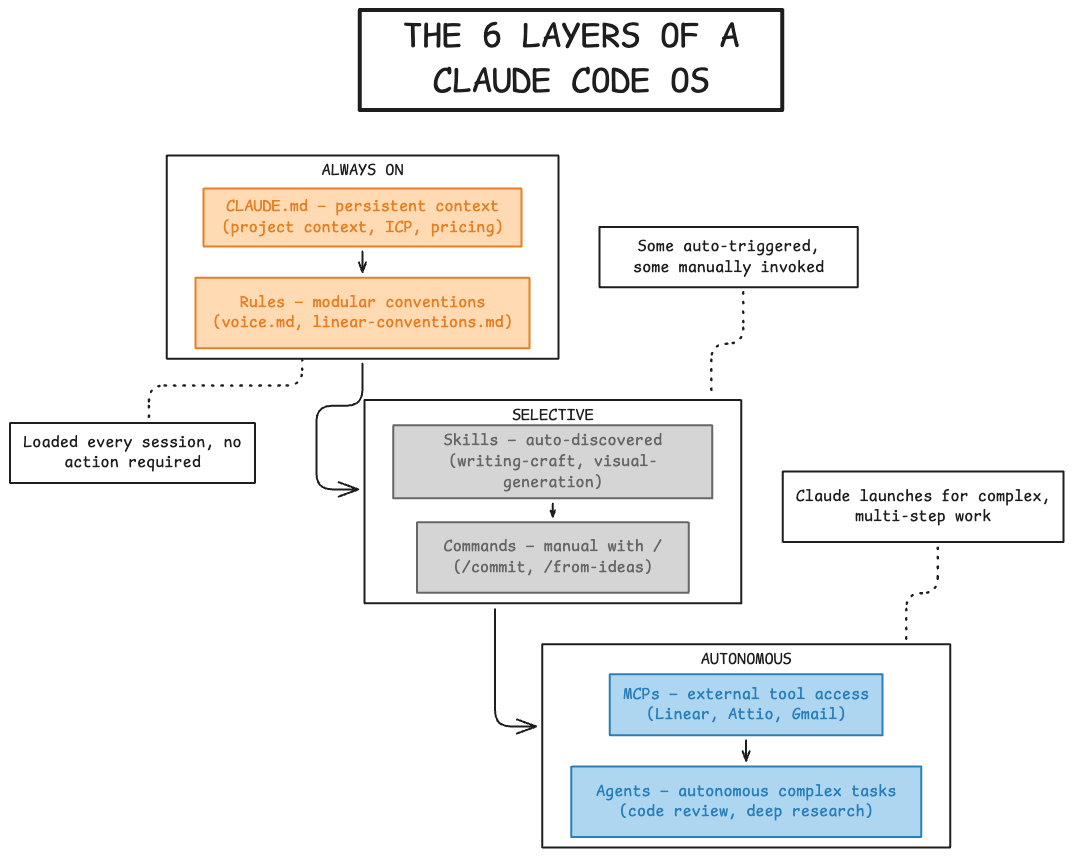
The bottom two layers (CLAUDE.md + Rules) are always on. They shape how Claude thinks.
The middle layer (Skills) is automatic but selective. Claude decides when to use them.
Commands are manual. I decide when to run them.
MCPs sit alongside everything, giving Claude reach into the tools where my work actually lives.
Agents sit above everything else. When a task is too complex for a single-shot skill or command—when it needs multiple rounds of research, reasoning, or tool use—an agent takes over. They’re rare, but they handle the hardest work.
All of it is markdown files and configuration. Plain English. No code.
/get-ideas — A Command That Replaced a Workflow
Let me make this concrete.
I mentioned the n8n workflow I replaced. Here’s what it actually did:
Every morning, it would:
Search my Gmail for newsletters tagged with “AI”
Pull the content from the last seven days
Extract key topics and trends
Cross-reference against my content strategy
Generate a report with story ideas
Send that report to my Slack
I was proud of it. Building it took hours of node configuration, prompt tweaking, and debugging webhook connections.
Here’s what replaced it.
A markdown file called get-ideas.md in my .claude/commands/ folder.
When I type /get-ideas, Claude runs through a process I defined in plain English:
Phase 0: Read my strategy docs—positioning, ICP, what I want to be known for. This grounds everything that follows.
Phase 1: Check recent content. What have I published on LinkedIn? Substack? What transcripts are sitting undeveloped? This prevents me from repeating myself.
Phase 2: Pull external inspiration. Search Gmail for tagged newsletters. Run research queries on trending topics. Extract angles worth exploring.
Phase 3: Generate a matrix. Cross-reference strategy, recent content, and external trends. Produce 15-20 ideas, each with a title and two-sentence description. Organized by type and theme—first principles, tactical, strategic, operator perspective.
Phase 4: Save and present. Write to a dated markdown file. Show me the top three recommendations.
Same outcome as the n8n workflow. But different in ways that matter.
Why it’s better
The n8n workflow was frozen. It did exactly what I built it to do—nothing more, nothing less. If I wanted to change the process, I had to rebuild nodes, adjust connections, re-test.
The command is fluid.
If I want to add a step, I edit a markdown file. If I want to skip Gmail one day, I can just say “skip newsletters.” If I want to focus on a specific topic, I type /get-ideas n8n workflows and it weights everything toward that.
The command operates on context.
When Claude runs /get-ideas, it’s not just processing text. It reads my strategy docs and understands what I’m trying to be known for. It checks my recent content, recognizes patterns. It connects external trends to my specific positioning.
The n8n workflow moved data through a pipeline. Claude knows the whole picture.
What the output looks like
I end up with a markdown file that has:
Recent content summary — what I’ve covered, what to avoid
External inspiration — newsletter highlights, trending topics
Ideas matrix — 15-20 ideas organized by type and theme
Top picks — three recommendations based on timeliness and gaps
From there, I pick an idea, record a voice transcript of my thoughts on it, and run /from-ideas to turn that into a Substack article and LinkedIn posts.
The whole system connects. Ideas flow into drafts. Drafts flow into content. Each command hands off to the next.
/weekly-review — Pipeline and Tasks in One Place
The other command I run constantly is /weekly-review.
Running a consulting practice means tracking two things: deals and tasks. Deals live in my CRM (Attio). Tasks live in my project manager (Linear). These are separate tools that don’t naturally talk to each other.
Every Monday, I need to answer the same questions:
Which deals need attention?
What tasks are overdue?
What should I prioritize this week?
Before this command, I’d open Attio, scan the pipeline, make notes. Open Linear, check what’s due, flag what’s stuck. Then try to connect the two in my head. Which deals need follow-up tasks? Which tasks relate to which deals?
Now I type /weekly-review.
What it does
Step 1: Pipeline review
Claude pulls my full pipeline from Attio using the MCP connection. It shows me every active deal in a table: name, stage, value, and a health indicator.
Green means on track. Yellow means needs attention. Red means at risk.
The health assessment isn’t magic—it’s based on rules I defined. Days in current stage. Last contact date. Projected close. Claude applies those rules and flags what’s slipping.
For any deal marked yellow or red, Claude pulls the full context—notes, contact history, what we discussed last—and tells me what’s going on.
Step 2: Task review
Claude pulls my tasks from Linear. It organizes them into three buckets:
Overdue (past due date)
In progress (currently active)
Upcoming (due in the next seven days)
It flags blockers. It identifies tasks that have been sitting too long.
Step 3: Follow-up creation
This is where it connects.
Based on both reviews, Claude proposes new tasks. Deal needs a follow-up call? Task drafted. Proposal sitting two weeks? Check-in suggested. Task blocked by something in the pipeline? Dots connected.
Nothing gets created without my approval. Claude proposes, I confirm, then it creates tasks in Linear with the right project, labels, priority, and due date. All following my rules.
Step 4: Summary
I get a combined view:
Pipeline: 5 deals, $45k total value, 2 need attention
Tasks: 3 overdue, 4 in progress, 6 upcoming
Top priorities this week:
1. Follow up with Acme on proposal
2. Ship client deliverable for Beta Corp
3. Prep for discovery call Thursday
One command. Both systems. Clear priorities.
Why this works
Any automation platform can pull data from two tools. Claude understands the relationship between them.
When Claude sees a deal stuck in “Proposal” stage for two weeks, it knows to check if there’s already a follow-up task in Linear. If there isn’t, it proposes one. If there is but it’s overdue, it flags that instead.
Claude reasons across systems.
And because it runs inside my full context—my conventions, my rules, my history—the output fits how I actually work. Tasks get created in my format. Priorities reflect my criteria. Nothing needs translation.
The Intentionality Layer
Building this system taught me more about my business than any strategy exercise I’ve done.
When you set up a workflow in Zapier or n8n, you’re connecting tools. Data goes from here to there. You think about what, not why.
When you build a system like this, you have to write it down. In plain English. What does my CRM structure actually mean? What makes a deal “at risk”? What conventions do I follow when creating tasks? What does my voice sound like?
You can’t be vague. Claude needs specifics. So you get specific.
I spent an afternoon writing my rule for Linear conventions. Naming patterns. Label taxonomy. Estimate scale. Priority definitions. I’d been using Linear for a year without ever articulating any of that. It was all in my head, applied inconsistently.
Now it’s written down. And it’s consistent every time.
First principles by necessity
There’s a phrase in software: “If you can’t explain it to a computer, you don’t understand it well enough.”
Building this system forced me into that kind of clarity.
Why do I structure deals the way I do? What actually matters in my pipeline? When should I follow up, and why? What makes content worth writing?
These are business questions. But I only answered them because I was trying to teach Claude how to help me.
The act of building the system was the strategy work.
The noise reduction
The other thing that happens: you realize how much noise you’ve accumulated.
When you’re designing from scratch, you only include what matters. You build exactly what you need.
My system has eight folders. A handful of rules. A few skills. A few commands. Five MCP connections.
That’s it. That’s my entire operating system.
I’m not saying it’s complete. I add to it as I find gaps. But I’m building toward what I actually need, not inheriting what someone else imagined I might need.
There’s a creative freedom in that. And a clarity.
What This Isn’t
I need to be honest about the limits.
This works for me. A solopreneur running a consulting practice. One person, one system, one set of preferences.
I’m not sure it scales. And I’m not sure everyone needs it. But once more people get the hang of this, this way of operating (which is interestingly less structured) will be the new norm. Systems thinking will look a lot different when applied to organizational design in the future.
The barriers
File management gets complicated with teams. Who owns what? Where do things live? How do you handle conflicting conventions? My system works because I’m the only one using it. Add a second person and you have coordination problems.
Accessibility is another issue. I’m comfortable in a terminal. I know what a markdown file is. I’ve spent years tinkering with tools like this. Most people haven’t. Asking a team to adopt this setup means asking them to work in unfamiliar ways.
Technical understanding matters too. When something breaks, I can usually figure out why. Read an error message, adjust a configuration, test a fix. Not everyone can. And right now, there’s no support layer. Just documentation and your own willingness to debug.
These aren’t small obstacles.
Traditional automation still matters
I also want to be clear: the n8n workflow I replaced wasn’t wrong.
I still use n8n. I build workflows for clients all the time. For most teams, agentic workflows and traditional automation tools are exactly where they should be focusing.
Not every problem needs this level of integration. Most teams would get real value from well-designed automations using tools they already have—Make, Zapier, n8n, combined with targeted AI where it makes sense.
The gap between “no automation” and “AI-native operating system” is enormous. Most of the value lives in the middle. Taking manual processes and making them automatic. Connecting tools that don’t naturally talk. Adding AI to specific steps where reasoning helps.
That work is where most organizations should start—and many should stay.
What I’ve built is a forward-looking experiment for someone who wanted to understand where this is all going. It’s not a prescription for how everyone should work.
The Shift
A year ago, I would have told you I’m not technical.
I’d been a Chief of Staff. An operator. A generalist. I understood tools well enough to use them, but I didn’t build things.
I’m not sure that distinction holds anymore.
I still can’t write a function from scratch. But I run my business on a system I designed. The rules are mine. The conventions are mine. The processes are mine. I can change any of them by editing a text file.
That’s the change I’m trying to describe.
I don’t know what AI will do. But I know what’s possible now for someone willing to spend a few weekends figuring it out.
An AI that knows your context. Follows your rules. Connects to your tools. Runs processes you define in plain English. All that’s left is figuring your own core business model and running with it.
If that sounds useful, here’s where I’d start:
Download Claude Code and open it in your terminal (30 seconds)
Voice-to-text transcribe your entire business model, way of working, and goals and have it repeat this back to you. Tell it you want to build an entire OS.
Type in /init to create an initial CLAUDE.md file to start, and keep going.
That’s it. That’s your operating system. Everything else is just layers you add when you need them.