Hello! Now that winter is closing in and I’m less inclined to procrastinate writing by going outside to touch grass, I’m back to putting my thoughts on the proverbial paper.
Since you last heard from me, quite a lot has happened…
we’ve got proactive agents available on the go that showcase themselves as friendly, “fun”, and somewhat creepy characters to make AI more inviting.
a new type of AI model is taking the deterministic, agentic workflow world by storm
the frontier keeps on expanding with the latest model releases from Google, Anthropic, and OpenAI - which we’ll cover a bit today.
And so much more…
…almost too much more?
For a lot of us, it can feel that way. And since I add to the noise just by writing about AI, I figured I could at least be useful while I’m at it. So today I’m sharing one way to make all this change a little more manageable. It’s the same approach I take teams through in my workshops and solopreneurs in the AI Build Labs I run as part of Manual Override, and it starts with the question I get asked more than any other.
Enjoy,
Harry
Fable 5.2 came out last week, and by the time I was wrapping up work for the week I noticed the question I get asked most was coming up even more than usual...
How do you stay focused (and relatively sane) with everything moving in AI?
Pretty fair question given it can feel like you’re getting flanked from every angle all at once. It could be new models, providers, updates to the apps themselves, or some new feature that kills yet another thousand startups.
Even pushing the bleeding edge myself, it can feel a lot like whiplash. Since January, I can’t count the number of times I’ve made small improvements to how I work, or completely overhauled how I plan my work and run my day.
However, I’m in a position where I have full control over my own setup, and I’m a business of one, so a better way of working is usually mine in the same afternoon I find it.
But I can see how it feels for most people. Even when you’re doing a decent job of staying up to date, the pace can make you feel like you’re forever behind. And if you’re in an organization with a ton of guardrails that are holding your experimentation back, it’s even tougher.
So today I want to share how I approach it in hopes that it gives you or those around you a new way to look at change (like the release of a new model) that avoids the everlasting FOMO.
First, the picture that makes each change easier to place. Then how I read a new model release, and the experiments I run to see whether it matters for my work.
There’s no right way to keep up
Part of the problem is that there’s no definitive way to keep up. There’s no single public change log of what happened, no matter how many newsletters you subscribe to. And even the people building these models don’t truly know where it all ends up. A perfect example is how Claude Cowork was built in less than two weeks after an aha moment watching how non-technical users were using Claude Code.
So the idea of having everything considered, of feeling like you’ve got a handle on all of it, is close to impossible.
That’s also why even getting “certified” in AI feels harder to justify, because what you learn doesn’t hold enough value for long enough to pay back the time up front.
So the question I loop back to is around what kind of understanding lasts longer than that or at least long enough to calm things down and keep things steady in the long run.
The goal has to change
I don’t think “getting good at AI” is knowing everything about it. With most topics, that’s a reasonable goal. With AI, given the pace of change, I think you have to adjust what the goal is.
The goal is to understand it well enough that changes from whatever direction stop feeling like a disruption (or distraction) and start feeling like an addition, or an alteration, to how you already work. A new release should spark exploration, ideas and some creativity, and most importantly, be analyzed in your own context of work (i.e. filtered for what is necessary to you).
That applies whether you’re an employee, a team lead, an executive or running your own business. Each of you needs your own way of processing what comes in, and that can look very different from one another.
And while informative in some ways, I don’t think that starts with trying to get more perspectives from thought leaders, hot topics from influencers, or viral demos guaranteeing you’ll be a power user in a week. There’s a step that has to come first.
AI is a system of parts
That step is to see and comprehend AI as a whole entity. It isn’t some magic thing that appeared out of nowhere. It’s a system of distinct parts that work closely together, and every change you see in the feed is a change to one or more of those parts.
The trouble is that each change arrives with its own new vocabulary, which makes the parts hard to piece together. For a lot of people, it’s hard to see the forest for the trees. It becomes weirder when we start talking about the same things in different ways and we question everything. And with how these applications are designed for frictionless access to AI, this only becomes more difficult.
I wrote about why in a previous post:
Why Easier Agents Will Make AI Adoption Harder
The result is that most people don’t know what they’re actually using behind the scenes. Without a picture of the parts, every release looks like a whole new “thing”, and everything you did before feels irrelevant. With one, the change slots into a picture you already understand.
So what is that picture made of?
Three parts worth knowing
To see the picture, you only have to get a litttttttle under the hood. I’ve gone deeper on parts of this in my Under the Hood series, so here’s the short version.
The model is the brain. A lot sits underneath it, like tokenization and training, but those are pretty structural, and when they change it typically shows up in a new model. The context window is everything the model can see while it works, and what changes most over time is what it can get access to, how it gathers it and when. The harness is the app or setup around the model. It gives the model tools, which act like the hands, and more tools become available through connectors (aka MCPs). When the model uses them to take steps on its own, looping back to its context each time to work or think longer, that’s an agent.
Under the Hood: A new Series + How Agents Actually Work
Under the Hood II: Why Context Windows Aren't Gas Tanks
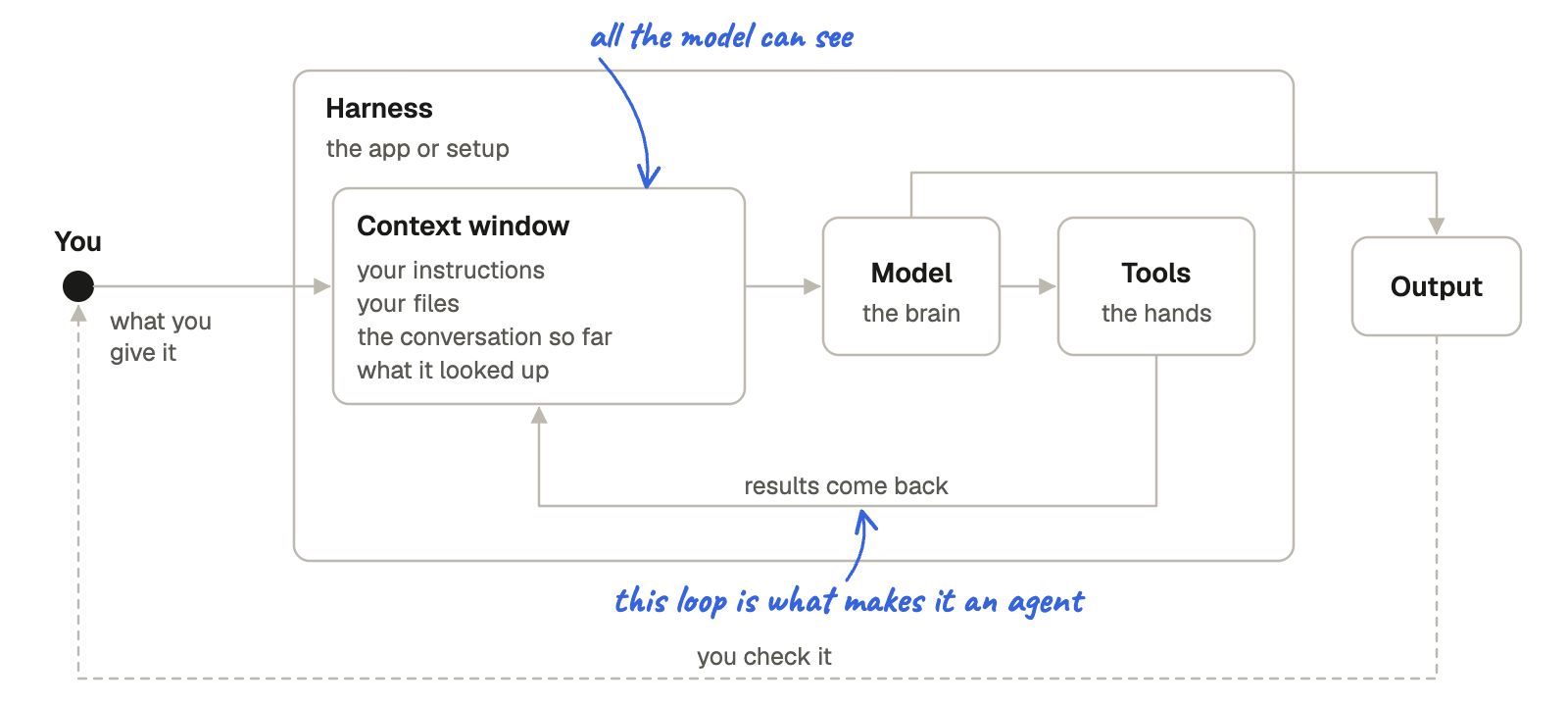
The point here is that each of these parts is a lever, and every release pulls one or two of them. The key is to know which are being pulled, why, and what impact it’s having.
Here’s an example, and it goes back to Cowork. When it first came out, a lot of people said it was so much smarter than Claude Chat. It seemed to be more inquisitive, it took longer to think and analyze, and it made fewer mistakes.
“Smarter” to many meant that it was powered in some new way, or that the product itself was an entirely “new AI”. While it can feel like that, neither of those was the answer.
What changed the output was the introduction of a new harness that the model could run inside. It gave the model the ability to act as an agent (loop) and the capability to use tools that were built into the harness. It wasn’t to do with the models powering their requests or new methods of training. In other words, the same model as before was now given more capabilities to produce a higher quality output.
When we can analyze these changes more acutely, in a systems-thinking way, and we can see what parts are impacted, what stays the same, and hypothesize what that means for our results, we start to gain more confidence in how we use the technology.
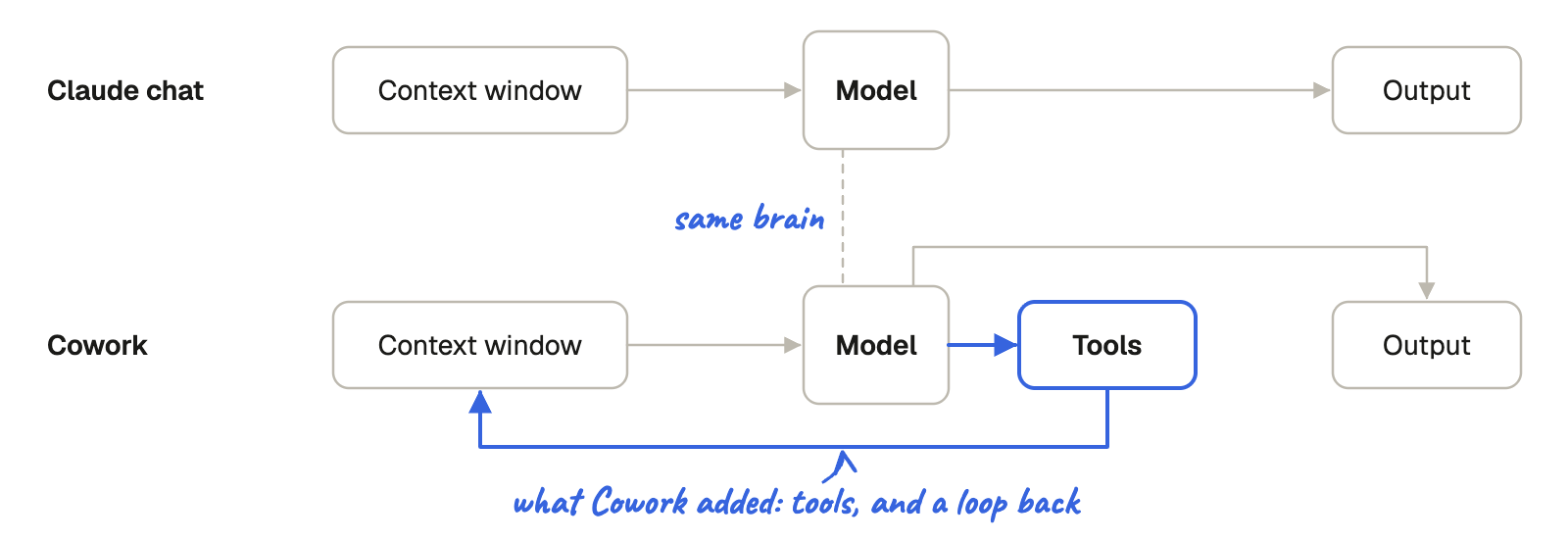
The change you’ll see most often in this system-of-parts is a new model, as that has some of the largest variability on the output alone. It’s also the one that makes the most noise and takes up the most headlines, so that’s the part I’ll go deep on.
How to read a model release
Take Fable 5.2, the release I mentioned earlier. When a new model comes out, there are three things I look at first (the benchmarks, the economics and the family) before jumping into the mess that is X and LinkedIn feeds.
The benchmarks
Labs tend to group their benchmarks by kind of work, like coding, business workflows, knowledge work, using a computer, search and reading charts. So the useful question to you is which of those kinds of work look like yours.
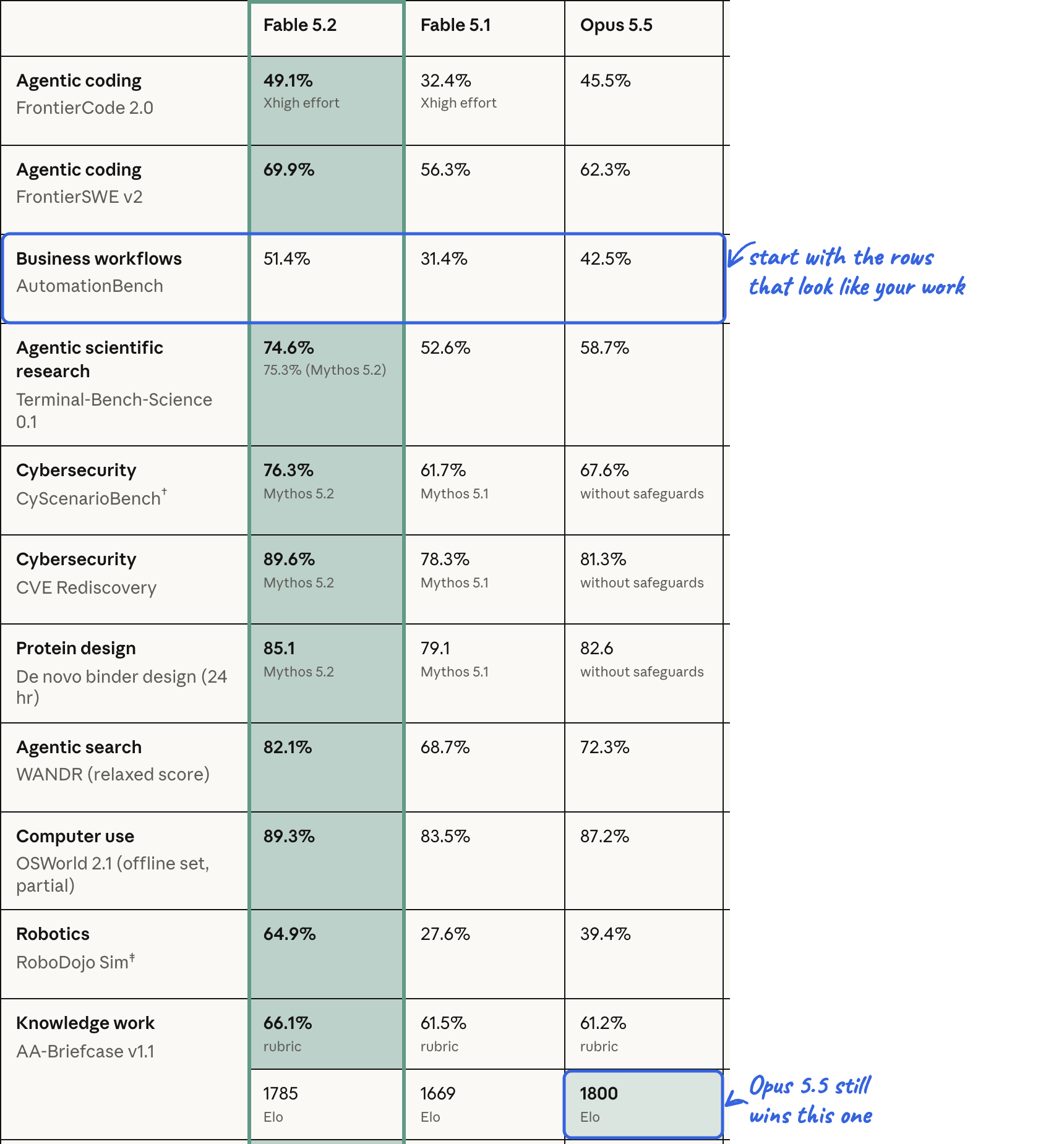
Two rows from this release are worth reading closely for those in the non-technical, knowledge worker space.
Business workflows is AutomationBench, built by Zapier from the patterns it sees in its customers’ automations. Each task drops the model into a small simulated company, with a CRM, an inbox and a calendar, and gives it one request of the kind an operations hire might get. Then it checks what actually changed in each app and scores it. Fable 5.2 scores 51.4%, the best in the table, which still leaves a lot of business workflows it doesn’t finish…
You’d think it’d be more, right? More on that another time...Knowledge work is AA-Briefcase, run by Artificial Analysis. The model works through multi-week projects in areas like product management and corporate strategy, and produces things like spreadsheets, memos and presentations. It gets scored two ways. The rubric score is a checklist and calculates the share of pass or fail checks it gets right, like using the right evidence and reaching the right conclusion. The Elo score is a ranking, the same kind used for chess players. Two models’ work is then put side by side and judged on which is deeper and better presented, and the winner moves up (i.e. how “acceptable” their work is relative to others).
While models are becoming quite multi-dimensional relative to previous iterations trained on specific areas (e.g. coding-specific agents), there are small nuances to look at with these benchmarks each time across and within providers. Just because it’s “frontier” does not mean it’s the best for the job you need.
There’s one more chart in the announcement worth a look. The chart below is FrontierCode 2.0. It is a coding test, graded on whether the people who maintain real open-source projects would accept the change.
While many of my readers are not pushing code (yet!), the important thing to see here is the concept of effort (how much thinking the model does before and while it answers) vs score (how well it does on the task) vs cost (how much you pay for tokens/usage) within a given model’s options.
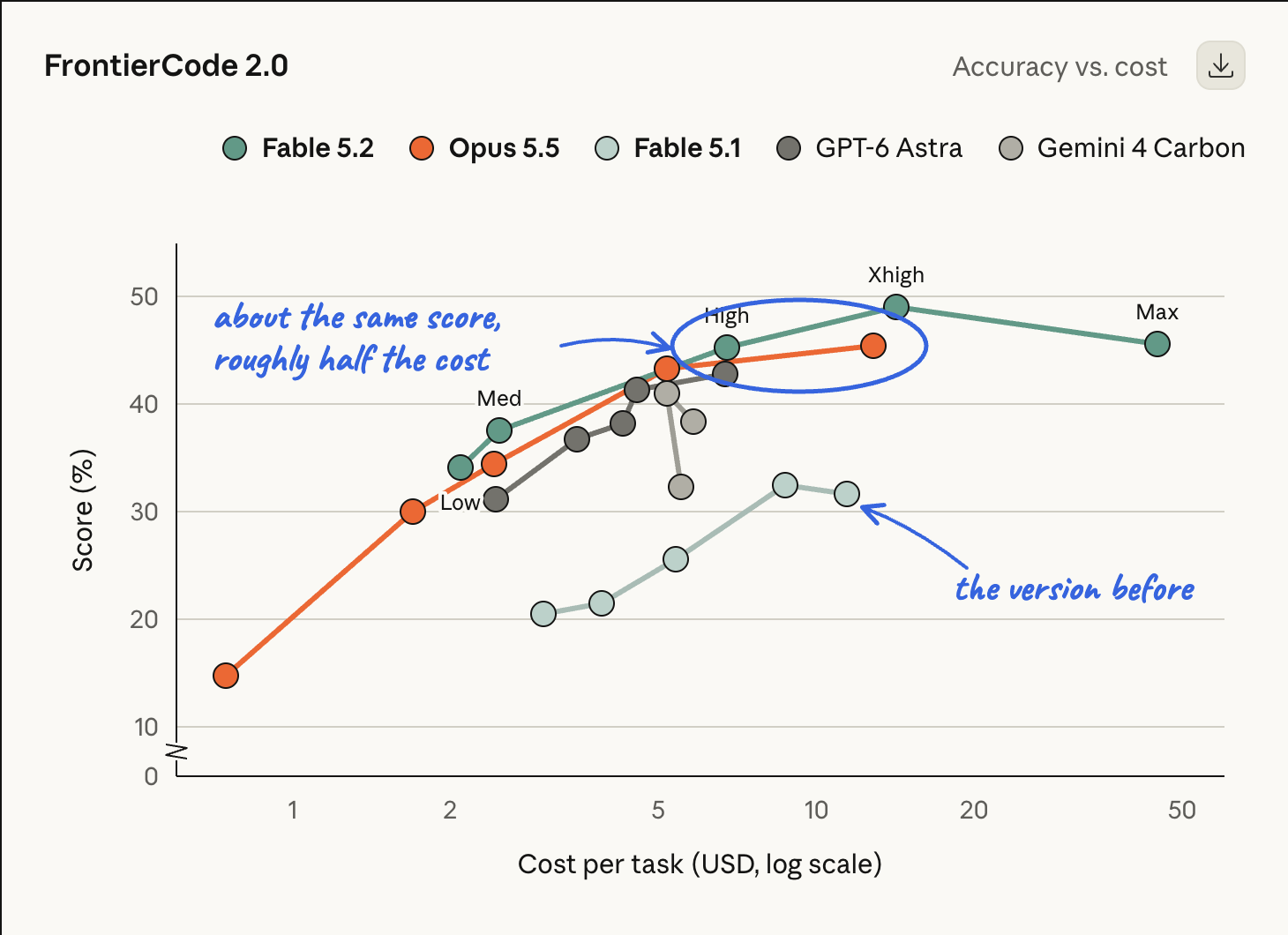
Each dot is one effort level, from low on the left to max on the right, and the further right a dot sits, the more each task costs. Fable 5.2 at high effort lands at about the same score as Opus 5.5 at its highest effort, for roughly half the cost per task.
So a newer model at a lower effort can match the older one flat out and cost less to get a stronger output, which is why it’s good to look at the true economics next.
The economics
Everything is priced in tokens, but even if you’ve avoided learning about tokenization, the main thing to look at is the relative economics. In short, it costs “money” (or usage for those on subscriptions) for the model to read your inputs and create outputs. For example, Fable 5.2 costs $8 per million tokens going in and $40 per million tokens coming out, against $4 and $20 for Opus 5.5.

That’s double the price per token. But what you actually pay depends on how many tokens a task uses, and effort changes that. The FrontierCode chart earlier showed Fable 5.2 at high effort matching Opus 5.5 at max effort for roughly half the cost per task, even at twice the price per token, because it used fewer tokens to get there.
So the price list alone won’t tell you which is cheaper. You have to read the price, the effort and the score together, on the kind of work you’d give it. Model comparison is truly all about striking a balance between efficiency and effectiveness - how well do you need the model to perform? And at what cost are you willing to spend?
The family
It’s worth comparing a new model across its own family, not just against other providers... although you’ll see this promoted much more because of #competition.
Fable 5.2 is the easy case. Anthropic says it’s faster than 5.1 and cheaper, and the FrontierCode chart above shows it beating 5.1 on score and cost per task.
So if you’re still on 5.1, make the switch!
The harder question is which size model to use when new options become available. Anthropic’s advice is to start with Opus 5.5 for most work, move up to Fable for the most ambitious technical work, or down to Sonnet or Haiku for lighter jobs.
While nice in theory, I know a lot of people wouldn’t dare use anything but a frontier model. “Why would I use something that isn’t the best of the best?”
Problem for them (and their usage bills) is that “cheaper” models no longer mean “worse”. Spending time analyzing model comparisons before you set your new defaults can save you a lot of time and $$$ if you’re constrained.
Haiku 5.5, released in October, is a good example. Many wrote it off as a nice upgrade that wouldn’t get used. However, next to Opus 5.5, in Artificial Analysis’s tests:
On knowledge work, Haiku at max effort beats Opus at low effort, for less than half the cost per task.
Opus at medium effort only edges ahead of it, at about six times the cost.
Anthropic points Haiku at summaries, sorting and routing requests, pulling facts out of documents, quick lookups and repetitive data entry. If that sounds like a good part of your week, it’s worth a run before you default to the biggest model.
Bring it back in the system
Model releases therefore beg a few new questions to consider:
What jobs do I use AI for? And does this model show improvements in that type of work?
Do I have enough “spend” to roll this model into my work?
How does it fare compared to a previous generation? Is the “older generation” still worth using?
Does this open up new use cases for me to explore? And do so at an efficient cost?
While answering these questions can help, it’s important to remember a new model is just one part of the system. What matters is how it works with everything around it. Does it use your tools and connectors differently? Does it handle your context better or worse? And what does that do to the output you actually care about?
For example, after my read on the release and relation back to my work, I find myself using Fable 5.2 on very little day-to-day work (i.e. knowledge work and business operations). It has yet to prove significant difference for me compared to Opus 5.5 in those areas. However, it has allowed me to explore new areas I haven’t applied AI to where it is unmatched (e.g. motion design and video editing).
The same goes for the other kind of release, because a “release” isn’t always a new model. Over time I see fewer changes to the core of the harnesses themselves, like Cowork, Claude Code or ChatGPT Work, and more to the tools and connectors that come with them. Those can change your output as much as a new model does.
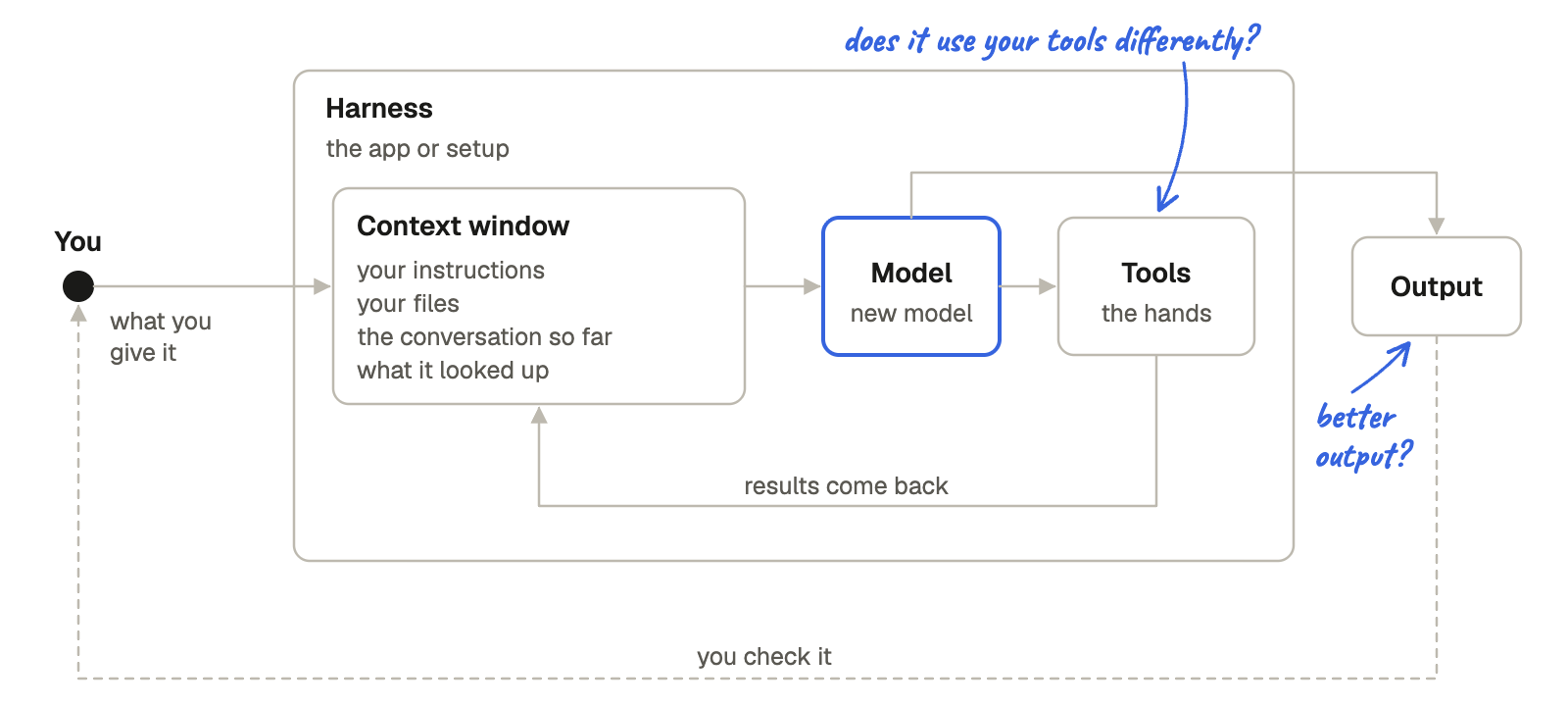
So everything above, from the benchmarks to the family, only tells you where to start. How a change plays out across the rest of your system is something you can only find out on your own work.
Four experiments to run on your own work
The way I find out goes back to the fundamentals of so many of our high school science experiments. One part changes while the rest stay the same, so you can see what that alteration does to your output. Here are the experiments I run whenever there is a structural change (like a new model, harness, or tool).
1. Same prompt, two models.
I give the same prompt to two models and compare the quality of what comes back. But I don’t give it any old prompt. Pick one that leans on the model’s judgment and reasoning, with your own context.
For example, “Here’s how our team decides which projects to take on, and here are three requests from this week. Which would you take, which would you turn down, and where does our way of deciding break down?”
2. Same model, different effort.
More effort means more reasoning, more time and more cost. Both Claude and ChatGPT now let you set it, from low to max. Run a deeper task on the same model at two effort levels and compare the result, the time and the cost. While you’re at it, watch whether it uses your tools and connectors differently at each level.
3. More context, then less.
Give it the background you’d give a new colleague, then run it again with only the instruction. You’ll learn quickly which parts of your context it actually uses, and which parts you’ve been carrying around for nothing.
You can also try this with disconnecting/reconnecting MCPs to see how it uses context from those sources to evaluate a decision or produce an output.
4. With and without your instructions.
If you work in a project with standing instructions, like a CLAUDE.md file, try the same prompt in and outside of that project and see how it performs. Anthropic says newer models follow written instructions more literally, so rules you wrote to patch an older model’s weak spots, like “double-check your work” or “CRITICAL: YOU MUST ALWAYS”, can start working against you. In their own test, removing those kinds of rules cut cost by 9% and raised accuracy by about 2 points.
Grounding yourself
None of these are really about the model release itself. They’re controlled experiments that you give yourself time to run. You know which variable you’re changing, and you judge the quality of what comes back. You’re treating it as your own lab of sorts.
That’s really where the “getting good at AI” comes from. Once you’ve grounded yourself in what you’re actually working with, you start connecting the dots (no pun intended, OpenAI). I can guarantee that the “noise” around AI won’t go away, but you’ll have a much better, calmer, and “scientific” way to process it all and relate it to what matters most to you (the output!).
So the next time something new lands, you don’t have to understand it through other people’s use cases, their definition of success, or to the fullest technical extent. You can run the experiment yourself, on the work that matters to you, and determine whether it fits the bill.
So when someone asks me how I stay sane with everything moving, all of the above is my honest answer. I don’t try to keep up with all of it... I just keep coming back to the parts, and I run all the experiments I need to.