
Hello! It’s been a while.
The short version of where I’ve been: heads down with clients across all sorts of industries, helping their teams actually get good at using AI. And that work is what led me here. Across very different companies, I keep running into the same blockers, misunderstandings, and similar aha moments. They’ve become common enough and useful enough that I wanted to share them somewhere wider than one virtual workshop room at a time.
So I’m starting a series here called Under the Hood, and this is the first chapter.
I want to start somewhere practical, with an observation about how these tools are actually built and presented. On the surface, it feels like a classic SaaS product problem. But underneath it is what I’m really trying to get at, both here and across the series:
The ones who are breaking through the most with AI aren’t simply the ones with the most tools, budget, or time to explore them. Instead, it’s those who are investing their time in knowing what’s going on behind the scenes with these models, harnesses, and solutions.
It may feel technical, and can be heavily engineering-focused at times. But I’m hoping to use this series to make AI a bit less scary, more digestible, and more inviting to explore. So let’s get into it.
The gap behind the text box
One of the more interesting things I’ve found exploring AI is the gap between how deep, powerful, and multi-functional these systems are, and how simple the little text box is that we use to talk to them.
The interface itself is just a text box. And the thing sitting behind that text box can write code, plan a quarter’s worth of business, file a ticket, browse the web, and call out to your CRM.
You’d never know it at first glance, though, because the text box looks like a search bar.
It’s the same interface and feel Google has used for decades. One search, an enormous algorithm and toolset on the other side, and the funny thing is, most of us have no real idea how it works… nor do we particularly care.
As long as it gives me what I need, I’m all set. And when something does break, we go to the mechanic, so to speak.
That’s been the product philosophy for the last twenty years or so, and honestly, it’s mostly been the right one. I don’t really want to know how my phone places a call… I want to push a button and hear it ring. I don’t want a manual for my email… I just want my email to send.
But AI is the first technology where I think that philosophy has actively backfired. No matter what the hardcore AI influencers say, there’s no objective manual, handbook, or best practice for using AI well.
The art of the possible has been left for each of us to paint on our own, and if we know anything about humans, it’s that we don’t thrive in that kind of ambiguity.
So we do the thing we always do when we’re handed something powerful with no instructions: we use it the way we already use the tools we know.
Why AI feels stuck
The productivity posts all over social media that felt exciting in 2024/5 now have a tired quality to them. We can write emails faster, produce decent outputs in record time, and do 10X! All true, but none of it feels like the future we were promised, because none of it actually changes the shape of what we are doing re: work.
It just squeezes the same shape into less time (or more if you are simply arguing with it about em dashes).
And from all the workshops I’ve run and the teams I’ve coached and the people I’ve tried to enable over the last year, there’s almost always a limiting factor. Unfortunately, that limiting factor is us, or more precisely, how we’re thinking about the model in front of us.
Most of us apply AI to the work we already know how to do, because that’s our domain of expertise and the only place we trust ourselves to judge whether the output is any good. It’s a reasonable instinct, but it’s also the ceiling we keep hitting.
The way I think about this is that we’ve been operating in an AI-assisted way. We’ve molded AI onto the job we already had, and what we get back is a faster version of that same job, not a different one and (in most cases) not a better one. We are left to our own devices, and our own devices are the methods we already know.
I’ll likely touch on how organizations should think about AI-Assisted vs AI-Forward approaches in another post, but for now, check out Peter Pang’s take from an engineering team perspective.
And while we can be quite a creative bunch, I think a big part of the blame lies with the industry itself and with how this whole thing has been sold as helping us be more productive rather than more capable. Similar to being efficient or effective, those aren’t the same thing. Productive means doing the old job faster. Capable means doing something different, which is where AI thrives.
What Anthropic noticed
Let’s take a look at Claude Cowork.
The story of why it exists is one of the more telling things I’ve come across this year, even if Anthropic doesn’t really lean on it. Their own non-technical people, marketers, finance, ops, the folks who’ve never written a line of code in their lives, started opening up Claude Code to get their actual jobs done.
For most, this sounded a bit odd, but perhaps not for a frontier lab like Anthropic. But the reason was not because they had the creators by their side who could help them out, nor were they really using it to Code as most expected.
They were reaching for it over Chat, because Code could do their work the same way it does code work for the engineering team..
So to make things a bit easier from a UI/UX perspective, Anthropic built Cowork: it’s essentially the same brain underneath, same agentic shape, just a friendlier wrapper with the tools tilted toward knowledge work instead of code.
Which brings me to the biggest flaw I see in all of this. What’s truly going to change how we function, make progress, and frankly survive with AI has nothing to do with having a friendlier thing handed to us.
It’s being handed the understanding of how the thing actually works. And yes, that means getting out of your comfort zone, taking a look at some unknown unknowns, and stepping into territory you’ve maybe been a little terrified of. But that’s the territory we’re in now, because the actual function of how we work is what’s changing.
Not being able to see, comprehend, and experiment with the core of how these things work is a disservice to you.
So back to Cowork: yes, it’s powerful, and yes, it’s intuitive. I agree with both. But the UI and the framing have planted three dangerous ideas that come up in pre-workshop intakes I’ve had with clients:
That it’s simply a new tool that’s smarter than Chat, without you knowing it’s the exact same brain.
That it can do more than you’re used to, without you knowing why, or what else it could do beyond what you’re asking of it.
That it has access to all sorts of things, without you knowing how to control that access, or that it can run a bit wild.
That it’s the only thing non-technical teams should be using, and Claude Code is for coding, when in fact that’s just Anthropic’s marketing doing some pretty heavy lifting.
I’m not saying you need to know the ins and outs of agent frameworks, or be able to rattle off what an SDK is. What I care about is that if you can see what Agent harnesses like Claude Code or Codex are actually doing, and translate that to non-technical work, you’ll be a more confident, more token-efficient, more effective operator.
So with this series, where I break down key concepts of advanced and practical AI, I want to leave you more confident in how to think about using AI, more able to talk to teammates and help them along on their own journey, and with a bit of peace of mind around the constant movement of all of this.
With all the noise going on, my hope is that you’ll know what noise to pay attention to, what to care about, and what to lean into, with fewer existential freak-outs.
Today I’m starting with a bit of a lookback to late 2025 with the Claude Code boom, and what’s changed since, and as you’ve probably guessed, we’re going to talk about what the hell an agent actually is, and apply that to Claude Code.
If you’ve spent any time on LinkedIn in the last six months, between the “I built an Agent” talk and the agentic workflow posts, it’ll feel like everyone and their grandparents are deploying agents to do everything. It can sound daunting, maybe like you’re behind, and make you want to close the laptop and go for a walk.
But as healthy as that can be, you may not need to end your day so abruptly. Because what I’ve found from those entering my workshops is that they all have wildly different definitions of what an agent is, and most people are either misinterpreting it themselves or, worse, confidently misguiding someone else.
What a model can do on its own
So let’s just get to a working definition. Start with the simplest possible use case, which is what I’ll call Chat. You open ChatGPT or Claude or Gemini, type something in, hit enter, and you get text back. That’s essentially the entire interaction model.
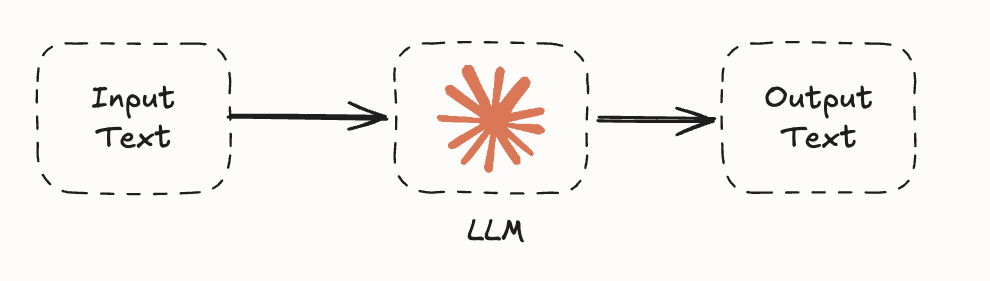
While the LLMs are incredibly powerful and also complex in how they work, all they can do, technically speaking, by themselves, is to receive text, run that text through their parameters, and produce text. It can’t open a file, send an email, or pull a report from your CRM. On its own, it can’t actually do anything else. Unfortunately, almost no marketing tells you that.
More and more over the last few months, however, labs and developers alike have found a way to have these incredible brains operate with hands through tools.
Tool use is the whole game
The moment AI can take action, execute work, do something in the world, we can start calling it an agent. And the mechanism that lets a model do that has a very boring name called tool use.
Tool use is the primary game to think about as you explore what agents can do. It’s the single most important concept in this entire conversation, and it’s the one thing that rarely makes it into the LinkedIn agent posts.
Before we get a touch more technical, the cleanest way to explain it is with a contractor.
Let’s say you hire a contractor to redo your kitchen. They show up, you tell them what you want with some specifics (new cabinets, an island, maybe a different layout), and they listen, they nod, they confirm a few things, they suggest alternatives, because they’ve done kitchens before and they’ve seen the mistakes you’re about to make.
You’ve got some agreement in place and a plan to go with. But it’s awkward because nothing is happening. You’re hoping they’ll write up a quote in their system, bring in their plumber, cross-check the structural wall, get the permit… but nothing happens, because the contractor doesn’t have a phone, a truck, a permit book, or a crew on speed dial. They can think about your kitchen, but they cannot do anything about it.
That’s what using AI through Chat directly is. A smart contractor with no toolkit. They can think about your problem, talk about it, and describe what should happen next, but they cannot do any of it.
Now imagine the contractor in real life:
phone in pocket
crew on speed dial
calculator
truck
permit book
spreadsheet of suppliers
Now they can make the calls, do the math, hire in extra hands who can also do work, and tell you when it’s done. The contractor just got equipped, and that’s what an agent feels like. The only difference is tool use.
We’ll get to what tools are readily available for most agents, but before we can do that, we need to understand more about the toolbox and how AI utilizes it.
The harness and the loop
There’s going to be a lot of talk about harnesses over the next year, and it’s likely going to be a bit overwhelming. It’s the architecture that goes around an AI model to allow it to use tools and go farther than most day-to-day uses of AI.
As these harnesses develop further, capabilities will change, and it may feel hard to keep up. However, the core of how the AI functions in this harness will stay the same, and is the most important concept to grasp if you want to get the most out of it.
At its core, the AI model itself is still doing what it always did, which is taking text in and producing text out. It’s the harness around it that makes the text consequential.
Some of that text could be just a reply to you, similar to how Chat functions. However, some of it is an instruction for the harness to run a command, open a file, hit an API, search a directory, or even spin up a subagent.
The interaction model changes significantly.
Rather than supplying text back to you, the AI can now have the harness execute (use its hands), return the result, and allow the model to assess it. And depending on the task at hand, the AI can continue with more instructions in the form of a loop until it feels it has what it needs to produce text or artifacts back to you, the user. It’s as if the brain just got handed a remote control.
Here’s a look at how this flows at a general level:
We prompt the agent with a request
The agent analyzes that request. Based on the tools available in the harness, it will instruct the harness to execute these tools (e.g., “Search the web for X”).
The harness executes and gathers some form of output to return to the LLM to analyze.
Based on the output and requirements of the prompt, the LLM will either:
Instruct the harness to execute more steps (either more of the same tool or others)
Package up a reply to the user
The harness then sends the packaged up reply to the prompt, enhanced with analysis of the tools that were used, back to the user.
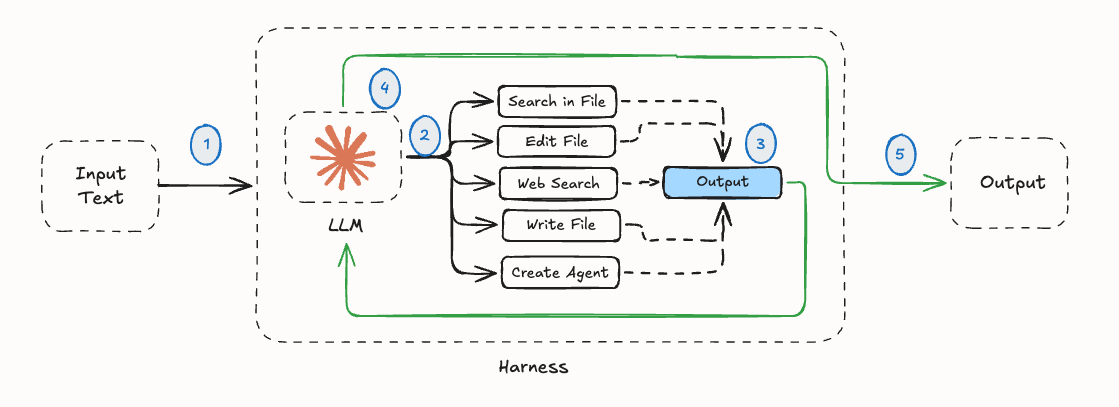
Let’s get even more granular and use an example of sending off a simple prompt to an agent along with a PDF that says, “Open this file and summarize its contents.”
When you send your message, the harness, behind the scenes, tacks on a few instructions you never see, teaching the model how to ask for things. Something like:
“If you want to read a file, reply with the word ReadFile and the file’s name.”
So when the model “opens a file,” what’s really happening is it produces that one line, the harness spots it, goes and reads the actual contents of the file with its tools, and pastes the contents back into the conversation. The model never touched the file or read it in the way you would expect. It just asked, in a format the harness was watching for.
Once you can see that one move, the whole loop makes sense, because it mirrors how any of us work through a problem.
You gather context
You make a plan
You take action
You look at what came back and adjust.
The model does exactly that, round after round: gather, plan, act, read the result, go again. It’s the same way our contractor would work once they’re properly equipped, sizing up the job, doing a piece of it, seeing what the room tells them, and revising as they go.
Now let’s get back to reality and consider Claude Code, since it’s the cleanest example. Claude Code is a harness. It’s a piece of software that wraps around the model and gives it a set of tools to operate with. While the harness is powerful, it is just plumbing. It still needs a brain to be useful, and that’s where the model comes in.
But the thing I think very few people internalize is that when you use Claude Code, you are using the exact same trained model you’d use in Claude Chat.
It’s the same weights, the same training, the same parameters. The brain you talk to when you ask Claude about your weekend plans is the same capable brain that’s doing some pretty complex work in Claude Code.
What changes is the harness around it and the tools it can reach for. Because when a brain knows it has tools, it behaves differently. It’s more thorough, and it often feels smarter, even though it just has tools.
So the mechanism, end-to-end, looks like this.
You send a message to Claude Code.
The model takes it in, processes it, and produces text.
Some of that text is the reply you see, and some of it is instructions to the harness.
The harness reads the instructions, runs the tools, and returns the output.
The model reads the output, decides what to do next, and produces more text. Some is reply, some is instruction.
Gather, plan, act, and on it goes, until the work is done.
That, end to end, is what an agent actually is, and it’s less mysterious than the marketing suggests. But with such a powerful harness available out of the box, it’s the tools that it has inside that will change how you work with it and how you can customize it further.
Understanding Tools and MCPs
Tools come in every shape and size. Claude Code’s default tool set includes Bash for running terminal commands, Glob for finding files by pattern, and Grep for searching inside files. It can read, write, and edit files. It can search the web.
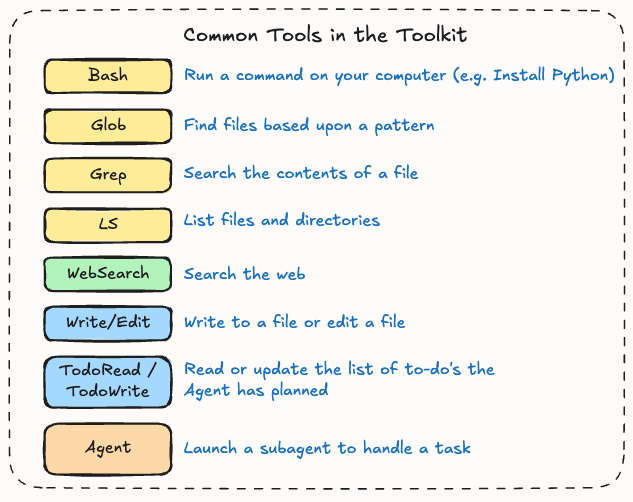
While pretty uncommon in the non-technical world (Glob and Grep sound like great orc names for LOTR), none of this is too exotic. These are the things any developer does on any day, and the model just got handed them.
It gets more interesting when the tools get wider.
Launching subagents is a tool, which is a way of saying the model can spawn a copy of itself in a fresh context window to handle a contained subtask, return a clean summary, and let the main thread carry on without the noise. When that happens, it starts to feel different, because the thing can delegate to itself.
And it gets really interesting when you add MCPs, which probably deserve a Part 2 on their own. People talk about MCPs like they’re some new mystical category, but they’re not.
An MCP is a way of giving a model more tools. And those tools can be part of interacting with other systems and tech stacks.
Connect a Granola MCP to Claude Code, and the model now has tools to read your meeting transcripts. Same logic for Gmail, Attio, whatever else you’ve got. Each “connector”, as it’s called in the desktop version of Claude to simplify things, is just another button on the remote control.
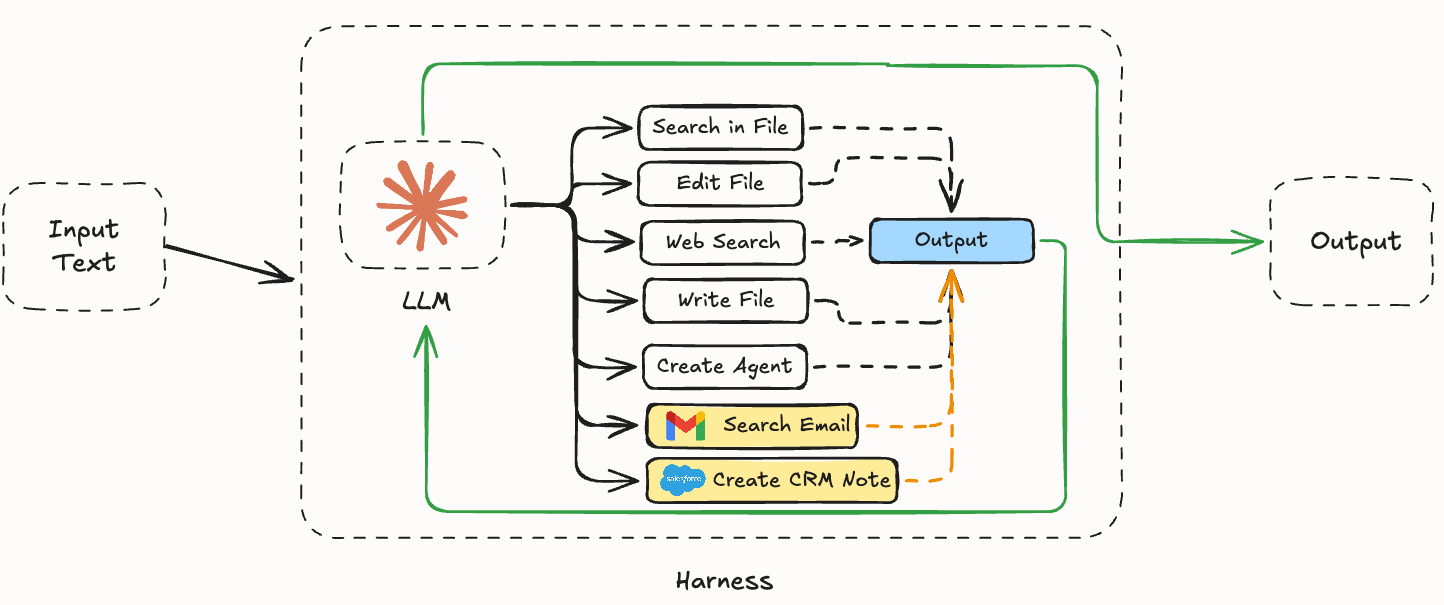
So when someone says they’re using an agent, the only thing they’re really saying is, “I’m using an AI model to help me solve a problem, and that model has been equipped with tools via a harness, so it can actually do something about the problem.”
That’s the whole definition. Strip the marketing off the thing, and you find a small, clean idea underneath.
The same logic applies to Codex, and the same logic applies to Cowork. They’re all variations on the same shape: brain plus harness plus tools.
Which also means that Cowork and Code are more similar than you’d think.
Why Claude Code is called Code
Counter to what most people think, Claude Code is not only meant for writing code. Hopefully, the explanation so far has led you down a path where Claude Code is simply a harness with lots of tools that can do lots of different things, powered by an AI model that you’re probably quite familiar with already via Chat.
Claude Code is called Code because the original problem it solved was about codebases. When you have a codebase with thousands of files similar to a company wiki, you cannot upload it into a Claude Project and ask Claude to read all of it, because:
The context window (i.e., the amount of space the AI has to take in text/context, think, and output context) isn’t big enough
The relevant pieces aren’t obvious
Most of the file tree is irrelevant to whatever you’re working on at any given moment.
So the harness was built to give the model a way to (first breathe, then) efficiently search, read, navigate, and operate on a codebase without trying to load the whole thing into its head at once. If we go back to some of those tools listed earlier, the use of Grep, Glob, LS, and Bash commands becomes really effective at finding and gathering just what is needed.
This is why it’s good at coding. The harness + model knows how to manage context, and codebases are the perfect test case. Remember, the model inside the Claude Code harness is great at coding - but it’s no different from the one you’re already using.
Now consider any other professional context. Say a finance team’s reporting stack, a marketer’s brand archive, a founder’s investor notes, and a customer success team’s account history, as examples. Each of these is, in its own way, a codebase: too much context, some of it useful, most of it irrelevant to the specific question in front of you. An efficient way to search through it, parse it, understand it, design a response, and execute is exactly what every knowledge worker needs.
Anthropic, to their credit, saw this. As mentioned earlier, they watched their own non-technical employees figure it out by switching from Chat to Code, and so they shipped Cowork: a safer, friendlier interface to the same underlying machine.
And while a helpful starting point to start working with Agents, I think Cowork misses the point.
Rather than a safer interface to play with, we needed to understand that Claude Code is what it is because of the harness. The renaming/branding is a helpful touch, but it implies that the version for non-technical people is different when it isn’t. And with its rough edges sanded off to be less intimidating, I find that it’s very hard to tap into the full agentic capabilities of the Cowork harness as a result.
Brain, harness, tools, loop
The architecture of an agent really is this simple. A brain that produces text, a harness that runs some of that text as instructions, a set of tools the harness can call, and a loop.
For those scratching the surface, there’s not much else under the hood that you need to know to get started. The whole thing is brain plus harness plus tools, looping until the work is done.
The architecture is simple, but the implications are far bigger. Almost everything being marketed as a new agent product is, mechanically, doing roughly what I just described. Cowork, Code, and a well-equipped instance of Codex are the same thing in three different wrappers.
And even with these solutions, most of the people I meet are still operating in the AI-assisted ceiling and don’t yet see the ceiling, because the harness has been hidden from them by the standard SaaS product philosophy.
This is why going under the hood matters. I don’t expect you to argue about agent frameworks at a party, but I hope with this series (and this as a starting point) that you can ask better questions, of better models, with better tools, and stop bouncing off the same ceiling.
Once you can see the mechanism, the questions you ask of it change. You stop asking “can you do this for me,” and start asking what tools the model has, what context it needs, where that context lives, and what the right shape of the output even is. You collaborate with it the way you’d collaborate with someone on your team, and the thing in front of you stops feeling like a black box and starts feeling like a colleague with a particular set of capabilities, some you’ve already met and some you haven’t.
At the moment, painting the art of the possible and having the likes of Claude Code be the one to get you there is setting the top performers apart from others. But it only comes once you understand what’s happening under the hood.
Next time, I’ll get into how to actually work with one of these things, now that you know what one is.
Hopefully this was helpful!