
Welcome back to Under the Hood, where I take the parts of AI that sound technical or intimidating and try to make them genuinely useful, so you can work with AI with more confidence and fewer existential freak-outs.
If you missed my first post about why I started this series and how Agent frameworks work, you can find it below. It’s not required, but it’s the best place to start.
Under the Hood: A new Series + How Agents Actually Work
After my last post, you might have tried out Claude Cowork and Code to see what Agents can do. Maybe you explored its tools, checked which MCPs you could connect, or planned bigger tasks for an agent than you expected.
These are all great ways to use Agents as you explore further. But you might have noticed there’s a limit to how far you can go before things change or stop working. That limit is called the context window.
The context window is like the AI’s brain capacity. It’s measured in tokens, which are small pieces of text, usually a few characters or a word. The context window shows how long you can use the chat before the AI starts forgetting earlier details.
It’s a simple concept on the surface. But the simplicity of it all hides many important implications that affect the output you get from AI and help explain some of the more frustrating and distrustful moments we have with it.
With that in mind, let’s move from background to practical tips. Today, I’ll explain how context windows work, how to manage them, and how to talk about context in a way that’s actually helpful (not just saying ‘context is king or queen’).
We read it like a gas tank.
Visually, the context window looks like a single gauge. That gauge is always measured in a consistent unit of tokens. Each model has its own context window size, and depending on its depth or intelligence, it will use up its context window at different rates of efficiency.
At face value, it doesn’t sound too far from how we think about cars and their gas tanks. There’s a nice E to F gauge to tell us how much we have left in the tank. It’s always measured the same way. And each car has a different capacity and engine to manage it all.
It’s easy to think of context windows as honest gauges: full means full and empty means empty, and each unit gets you the same distance.
Just as I did in high school and definitely not in my 30s because I’m a responsible adult now, I can squeeze out that last mile home on E based on feel and intuition without second-guessing.
I can do the same thing with my context window, right?
Go under the hood of your context window, though, and the whole picture falls apart. Technically, it is one tank. But it breaks the gas-tank promise in three ways at once, and once you see them, you look at running on E a bit differently.
A more accurate analogy: a marathon. The last mile isn’t like the first; each step takes more effort, and not every step covers the same distance.
Unlike marathon training, I’ll cover the most important parts to understand, such as:
What makes up a context window, and why it’s never truly empty to start
How using the context window impacts quality
When to start working with a clean context window
Why a bigger context window doesn’t mean better
And how to spend the window you’ve got on purpose
The gauge never starts empty.
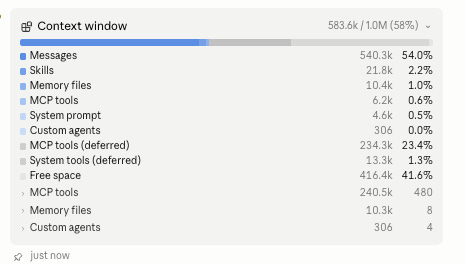
Let’s start with what’s actually in the window before you type anything. Before you say a single word to something like Claude Code, the window is already partially used. This may sound odd, but it’s comprised of all the things the agent needs to have on hand to be an agent:
There’s a system prompt helping the model understand how to run and use tools.
Reference to memory files that it may have created from past sessions.
Descriptions of your /skills you’ve given it access to
References to the MCPs you’ve connected and their available tools
Along with other global and project instruction files, many of which you can learn more about in an old post of mine that’s maybe more relevant than ever:
How I Built a Business Operating System in Plain English
So before you begin, know that your context window is never really at 100%.
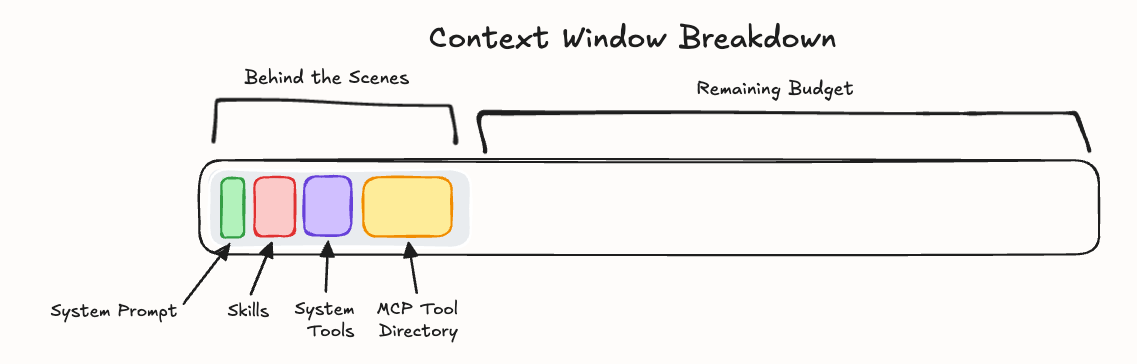
Then the session starts, keeps filling, and typically happens quite fast. Because, similar to the context at the start, holding more than you may have expected, every tool result, search dump, and reasoning the model does as you work with it gets stored in the window. It’s no longer just made up of the back and forth you have in the chat window.
As Anthropic puts it, the window is “all the text a language model can reference when generating a response, including the response itself.” Its own output counts against the same tank.
So that “room left” number doesn’t tell you much about what’s actually in there. You pictured an empty tank you could fill, but in reality, it was already part full before you woke up, and the session keeps adding to it from there.
Practically speaking, this doesn’t mean you’re being cheated out of context. All of that pre-session context is extremely helpful for the model to run. The key thing to know is that having lots of skills and MCPs connected to your Agent - if unused - can eat away at valuable context that could be used more efficiently.
The gallons aren’t equal.
Even if we know the context Agents start with, more importantly, we need to be aware of how these agents work with context over time in our sessions. Because they don’t follow the same mental model we mere humans do.
Specifically, the model has no built-in memory between chats or turns, unlike us. When we converse with someone, there’s a natural flow to the discussion. We typically build off the last point spoken and go from there. And from a product experience perspective, it seems to be the same when we chat with AI. But it technically isn’t.
It starts with us providing an input. When the AI model receives this input, it will produce an output message. Pretty straightforward: our expectation is that, for AI to produce its next output, it would just need to take in the new context from our next message.
Instead, every time it responds, it re-reads the entire window from scratch, start to finish. It’s re-reading the whole transcript of it with every turn. It’d be like having to read every text message you sent to someone ever before replying to their latest.
So as you build context, the next thing you send is never read on its own. It’s read against everything already in the window: every file it read, every tangent you chased, every dead end that came before it.
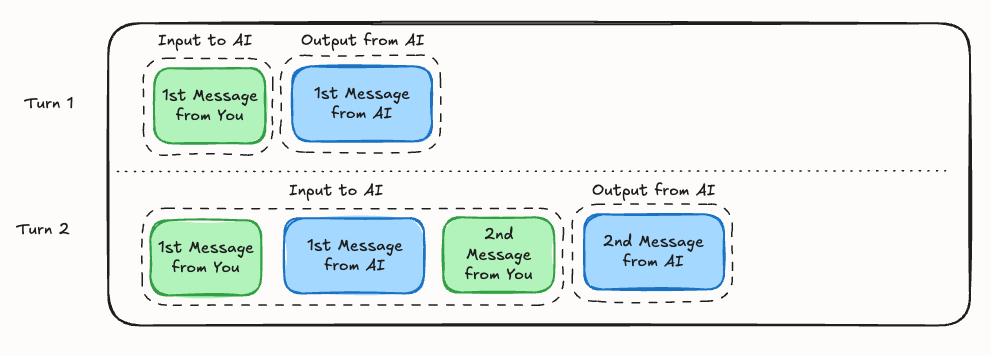
It starts to explain something we have all met with AI - why does quality drop when I’m giving it more context?
Think about how you actually reason. You hold a few things in your head at once and work well across them. Hand you a five-hundred-page binder and ask a question that turns on three sentences scattered through it, and you’ll do worse. Your attention is finite, and you just spread it across five hundred pages.
The model has the exact same constraint. As Anthropic puts it, “like humans, who have limited working memory capacity, LLMs have an ‘attention budget’ that they draw on when parsing large volumes of context. Every new token introduced depletes this budget by some amount.”
This implies that every session needs a job. Every lane you take a conversation down is more context that every future message gets read against, which is why it’s important to be focused on what you are trying to achieve - and why a token spent in a near-empty window buys sharp, focused attention while that same token spent in a crammed window buys a fraction of that. The risk and miles get more expensive the further you run, so steering carefully is as important as keeping track of the distance you’re going.
Don’t run it to E.
While knowing that Agents can handle a bit more context than we might expect, many of us still default to disregarding it and simply going until we hit the limit. There’s an assumption that, even if I did “waste” context, I’ve still got a context window to use, and I don’t want to feel like I’m starting over.
The problem is that the model’s performance and quality can degrade over time, especially as it has more context to work through. Mechanically, this is called context rot, which means the AI starts to “forget” or lose track of earlier information as more information is added.
Chroma put 18 models through nearly 200,000 calls in an industry study and found it plainly: “models do not use their context uniformly; instead, their performance grows increasingly unreliable as input length grows.”
It’s common enough across all models that it’s important to think about as you get into deep sessions with any Agent today. At some point, the Agent is working with so much context that it becomes much harder for it to process it all and deliver the output you expect. You may find the AI is forgetting important information, not thinking as hard, or simply providing output that is significantly lower quality than you’re used to.
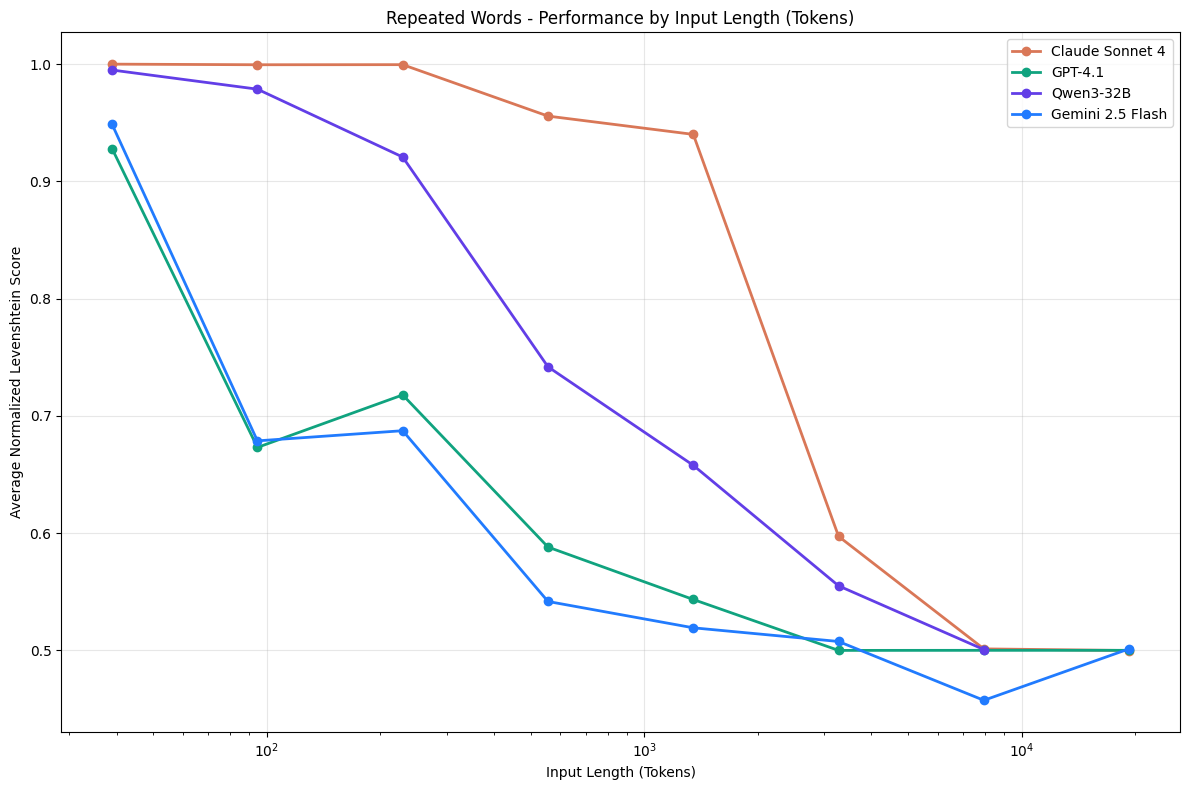
I typically find that once an Agent has hit around 50-60% of its used context window, it’s time to start fresh.
Unfortunately, none of this context rot impact shows up in the interface. Interfaces flag you when the conversation is “too long.” Claude Code shows a bar that fills and then auto-compacts, squeezing the conversation down to roughly 12% of its prior size so you can keep going. Compaction (we’ll touch on this later) is genuinely useful, and I lean on it constantly. But the rot started long before the gauge looked scary, and that’s the part you don’t get shown. You’re watching the fuel level while the engine quietly loses compression.
So, when do you start fresh? As I mentioned earlier, I usually reach the 60% mark and then aim to work in a new session, but in many cases, it depends on what you notice in the output. Things like repetition, forgetfulness, contradictions to an earlier decision, or drifting away from what you asked for.
My rule of thumb: start fresh at the first symptoms, or when the task in front of you changes shape (long before E).
Which leaves the obvious counter: just get a bigger tank, right?
A bigger tank won’t save you.
The windows keep getting bigger, and the models keep getting better. Won’t this solve itself?
Yes, the models have genuinely gotten dramatically better at long context, and the old line that models break at a few thousand tokens is out of date. But the issue with context management and window efficiency still exists because the problem is structural.
Every token relating to every other token is an n-squared problem, baked into how these models are built. As Anthropic puts it, “context windows of all sizes will be subject to context pollution and information relevance concerns.” A bigger tank doesn’t escape that.
And while hearing that context windows are being expanded to 1M tokens is impressive, the best way to interpret it is to assume the tank is bigger, but the engine is still the same. It helped solve the problem of having to chunk all of our inputs into multiple chats, one after the other, but it hasn’t addressed how the models handle all that context and output tokens back to us.
A bigger window also leaves an opportunity for higher costs. If we recall how Agents use all previous back-and-forth as inputs, all of that needs to be processed, which comes at a cost. A request that fills 900K tokens bills at the same per-token rate as a 9K one, so it costs roughly 100 times as much, on every call.
It’s also slower. The model reads the entire prompt before writing a single word, so it drags on longer and longer as the window fills. A near-full tank risks worse answers and makes you wait longer for them.
And a bigger tank doesn’t use itself well. On the same model, around 16K of curated context beats 128K of raw. A focused prompt of roughly 300 tokens beat a 113,000-token one on every model tested, because the small one held only what mattered and the big one buried it.
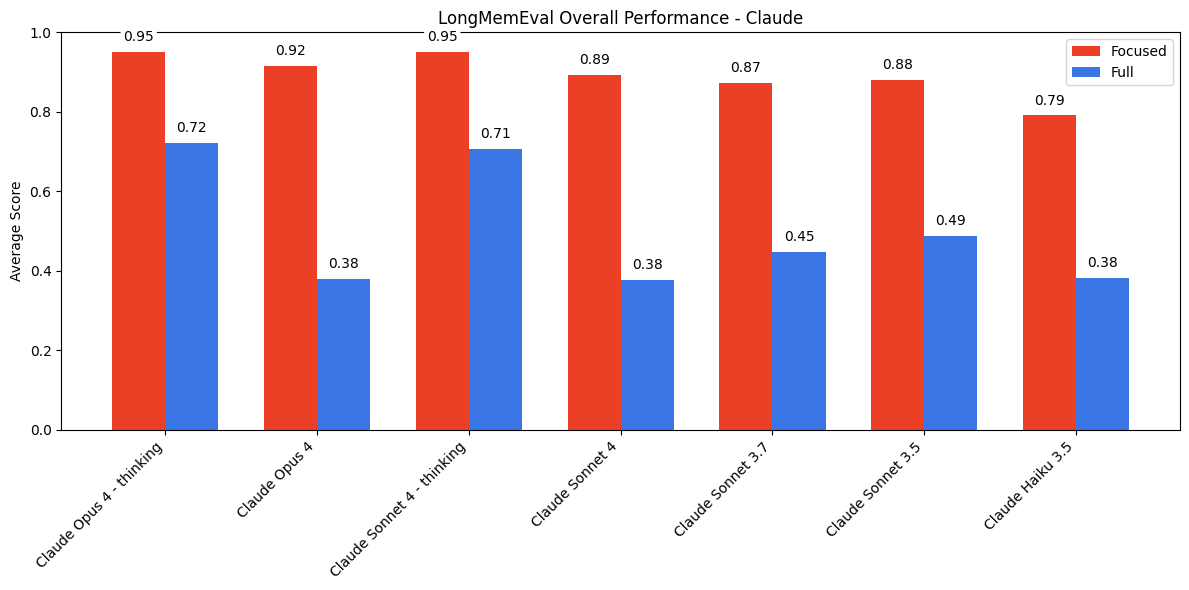
Spend the window on purpose.
So how do you actually spend it well? Four habits cover most of it, and none of them are technical.
First, look at the window before you work. In Claude Code, the context window can be visualized with /context comm and shows you the startup breakdown of your window, the same load we started this post with. Most people find the same surprises: skills they never use, every description preloaded, and MCP servers carrying dozens of tool definitions, all spending your budget before you’ve said a word. Trim the loadout to what you actually use.
Second, give a session one job. Now that you know every message is read against everything before it, a session that has chased three different tasks is three lanes of context fighting each other. Keep one window pointed at one job, and start a new one when the job changes.
Third, keep your active sessions fresh and store context where a fresh window can reach it. When work needs to continue past a session, checkpoint it: have the agent write the decisions, the current state, and the next steps to a markdown file before you close out. The next session starts clean and reads the doc instead of inheriting the sediment.
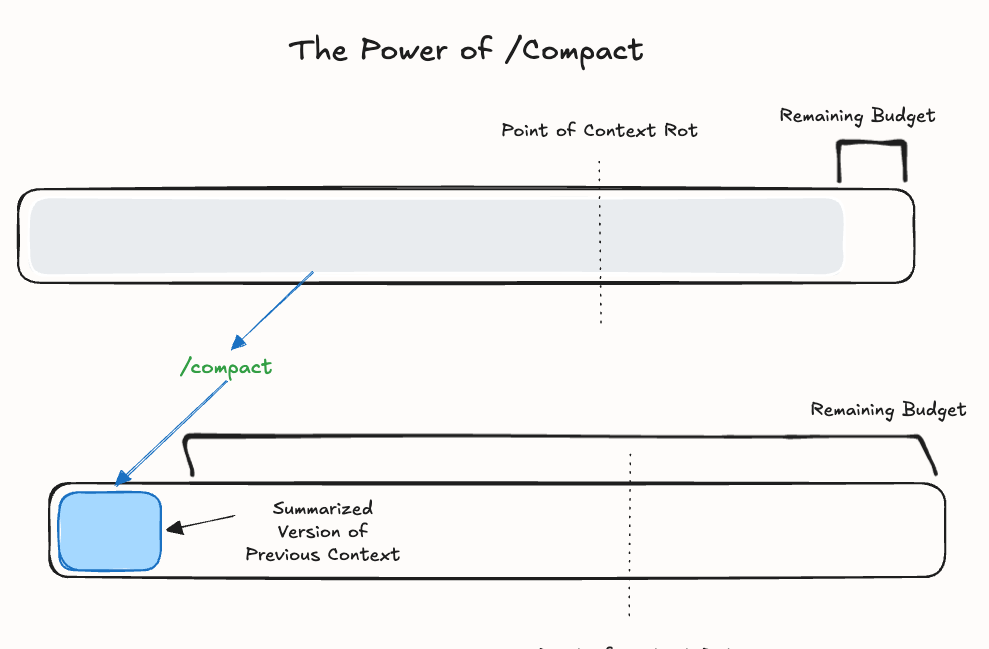
Alternatively, use /compact to have Claude Cowork and Code compress and summarize your built-up window into a relatively detailed snippet for the Agent to continue from without having to store context elsewhere.
Fourth, graduate to the /handoff, the move that changed my own workflow the most. When a thread is rotting, or an adjacent task pops up that doesn’t belong in this conversation, extending the session guarantees more sediment, and compacting clobbers whatever you were mid-stream on. So I tend to use a custom skill called /handoff instead. It asks the agent to write a short doc that captures the purpose of the next session and provides pointers on what it needs, and then let a fresh window pick it up.
Matt Pocock, who packaged this as a /handoff skill, has a design rule worth following for all agents: “do not duplicate content already in other artifacts... use pointers instead.” It’s how good agents already treat context, too. As we know from my first post, the likes of Claude Code never load the whole repository of files we’ve given it access to into the window; it fetches what it needs, when it needs it.
It was never a tank
The windows will keep getting bigger, and the models will improve, but context management will be the underlying capability to get the most out of them consistently.
Once you stop seeing context as a capacity the labs hand you, and start seeing it as a budget you spend, a few things change at once.
You stop blaming the model for failures that were really about a crammed window.
You can hand an agent something big and messy and keep it sharp through the whole job.
You stop asking “can it do this for me?” and start asking “does it have the right context, and have I actually pointed it there?”
Stop filling the window, and start spending it. Hopefully this was helpful!